
Home · Technology · Nov 4 archive
Apple Watch Series 12 and Ultra 4 Beta Launch Siri Recap and Live Rewind
· Confirmed
In Short: Apple has released the watchOS 27.3 beta, introducing two new Audio Intelligence features for the Apple Watch Series 12 and Ultra 4: Siri Recap and Live Rewind.
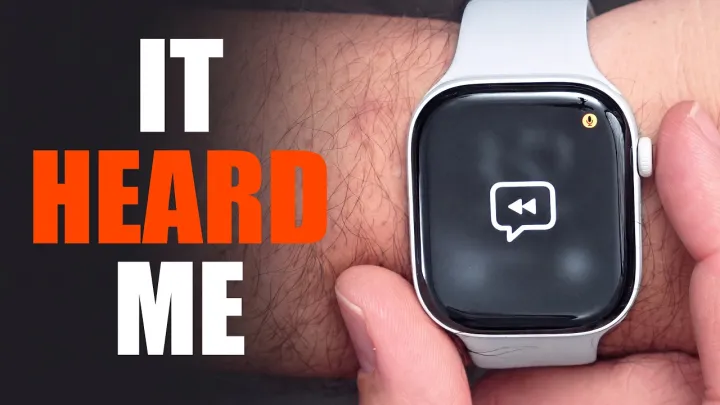
Live Rewind allows users to double-press the Digital Crown to see a transcript of the previous 15 seconds of a conversation. This feature can help users catch words they missed or review summaries of conversations later.
Siri Recap, on the other hand, uses ambient listening to generate summaries of conversations throughout the day. When enabled, Apple Intelligence will automatically generate a title and key points that users can review in the Siri app on their iPhone.
Apple has emphasized privacy protections for these features. According to the company, raw audio used for processing is completely inaccessible to the operating systems, apps, the user, or Apple, and all processing occurs locally on the watch.
Apple has published a detailed Privacy Overview covering the Audio Intelligence features on its website, outlining how these features do not create or store audio recordings and how potentially sensitive data is not sent to the cloud.
Users can access Siri Recap and Live Rewind via the Siri app on their iPhone or through the Control Center on their Apple Watch.
These features are available in beta with watchOS 27.3, which is now available for developers. Apple typically releases developer and public beta updates in the middle of the day in Eastern Time, suggesting availability in other regions could follow shortly after.
Apple Watch Series 12 and Ultra 4 pre-orders are live through the Apple website, with both models arriving in stores on Friday, September 18.
Siri Recap text is deleted after seven days if it’s not used, and the company ensures that sensitive information like financial details or government-assigned identifiers is excluded.
These new features make the overall watchOS experience feel more capable, enhancing the utility of the Apple Watch for users who want to stay connected and informed.
Apple first announced these features at its special event in September, saying they would arrive in beta later in the year.
Apple Watch Series 12 and Ultra 4 users can now access these Audio Intelligence features in the new watchOS 27.3 beta.
Background
Apple has released the watchOS 27.3 beta, introducing Siri Recap and Live Rewind for the Apple Watch Series 12 and Ultra 4.
The S11 chip powers several new Audio Intelligence features such as Sound Recognition, Live Rewind, Siri Recap, and faster Shazam.
<!--Infobox Start [Smartwatches]--> | name = Apple Watch | developer = Apple Inc. | manufacturer = Apple Inc.
What's confirmed
- You can activate Live Rewind by double-pressing the Digital Crown, and then see a transcript of the previous 15 seconds of a conversation.
- Apple has just rolled out the developer beta build of Live Rewind and Siri Recap, two new Audio Intelligence features for the Apple Watch Series 12 and Apple Watch Ultra 4.
- Live Rewind is the simpler one, and the one I’d try first.
- The watchOS 27.3 beta includes Siri Recap and Live Rewind, which Apple revealed when it unveiled the Apple Watch Series 12 and Apple Watch Ultra 4 back in September.
- Apple tells WIRED that "These features do not create or store audio recordings, and raw audio used for processing is completely inaccessible to the operating systems, apps, the user, or Apple," and that it processes locally on the watch so potentially sensitive data doesn’t go to the cloud.
- Live Rewind shows the last 15 seconds of speech as text when you double-press the Digital Crown, while Siri Recap summarizes your conversations through the day. iOS 27.3 also includes new animations that introduce Siri Recap, and one X post shows them. pdfu posted the animations on X, and they pair an Apple Watch with an iPhone.
- Live Rewind recalls what was just said in the last 15 seconds by showing a text snippet on your Apple Watch when you double-press the Digital Crown, so you can catch something you missed or are less familiar with.
- When the feature is enabled, Apple Intelligence will automatically generate a title and key points that you can review in the Siri app on iPhone.
- Siri Recap ambiently takes notes on your conversations throughout your day and creates high-level Apple Intelligence–generated summaries that you can use later to jog your memory, so you can stay present in the moment.
What's still developing
- No Audio Intelligence features identify or attribute speakers, so text won't say "Eric said..." or label speakers as "Speaker A" and "Speaker B." Siri Recaps filter potentially harmful content and sensitive information.
- Or you can save it to the stand-alone Siri app that shipped with iOS 27 for later access, which might be helpful if you’re trying to remember someone’s name or take a quick note from a fast-paced presentation.
- Apple is rolling out another round of software updates for developers this week.
- Imran Hussain is the founder and editor of iThinkDifferent, which he launched in 2008 to cover Apple news, reviews, and how-to guides.
- The Apple Watch itself processes the audio with a “lightweight” ML model that detects if the audio it’s hearing is actually a conversation you’re a part of.
- Borrowing a trick from dedicated recovery trackers, Apple now gives you an official readiness score from 0 to 10 every morning.
- You can ask Siri about the content of the snippet or simply save it to the Siri app.
- Live Rewind, meanwhile, helps you recall what was just said in a conversation.